
Note
Go to the end to download the full example code.
Compute histogram performance benchmarks#
This example benchmarks the compute histogram performance for the different algorithms available in Shamrock
 9 import json
10 import random
11 import time
12
13 import matplotlib.pyplot as plt
14 import numpy as np
15 from matplotlib import colors
16
17 import shamrock
18
19 # If we use the shamrock executable to run this script instead of the python interpreter,
20 # we should not initialize the system as the shamrock executable needs to handle specific MPI logic
21 if not shamrock.sys.is_initialized():
22     shamrock.change_loglevel(1)
23     shamrock.sys.init("0:0")
Use shamrock documentation style for matplotlib
30 shamrock.matplotlib.set_shamrock_mpl_style()
34 if not shamrock.algs.is_impl_set_compute_histogram():
35     shamrock.algs.autoselect_impl_compute_histogram()
36
37 default_config = shamrock.algs.get_current_impl_compute_histogram()
38 avail_configs = shamrock.algs.get_default_impl_list_compute_histogram()
39
40 print(f"Current config: {shamrock.algs.get_current_impl_compute_histogram()}")
41 print(f"Default config: {default_config}")
42 print(f"Available configs: {avail_configs}")
Info: defaulting compute_histogram implementation to impl : {"implementation":"naive_gpu","parameters":{}}  [algs][rank=0]
Current config: {"implementation":"naive_gpu","parameters":{}}
Default config: {"implementation":"naive_gpu","parameters":{}}
Available configs: ['{"implementation":"reference","parameters":{}}', '{"implementation":"naive_gpu","parameters":{}}', '{"implementation":"gpu_team_fetching","parameters":{}}', '{"implementation":"gpu_oversubscribe","parameters":{}}']
45 bin_edges = np.linspace(0, 1, 2049)
46 bin_edge_inf = bin_edges[:-1]
47 bin_edge_sup = bin_edges[1:]
48 rng = np.random.default_rng()
49 positions = rng.random(int(1e6))
50
51 bin_edge_inf_f32 = bin_edge_inf.astype(np.float32)
52 bin_edge_sup_f32 = bin_edge_sup.astype(np.float32)
53 positions_f32 = positions.astype(np.float32)
54
55 buf_bin_edge_inf = shamrock.backends.DeviceBuffer_f64()
56 buf_bin_edge_sup = shamrock.backends.DeviceBuffer_f64()
57 buf_positions = shamrock.backends.DeviceBuffer_f64()
58
59 buf_bin_edge_inf.resize(len(bin_edge_inf))
60 buf_bin_edge_sup.resize(len(bin_edge_sup))
61 buf_positions.resize(len(positions))
62
63 buf_bin_edge_inf.copy_from_stdvec(bin_edge_inf)
64 buf_bin_edge_sup.copy_from_stdvec(bin_edge_sup)
65 buf_positions.copy_from_stdvec(positions)
66
67 buf_bin_edge_inf_f32 = shamrock.backends.DeviceBuffer_f32()
68 buf_bin_edge_sup_f32 = shamrock.backends.DeviceBuffer_f32()
69 buf_positions_f32 = shamrock.backends.DeviceBuffer_f32()
70
71 buf_bin_edge_inf_f32.resize(len(bin_edge_inf_f32))
72 buf_bin_edge_sup_f32.resize(len(bin_edge_sup_f32))
73 buf_positions_f32.resize(len(positions_f32))
74
75 buf_bin_edge_inf_f32.copy_from_stdvec(bin_edge_inf_f32)
76 buf_bin_edge_sup_f32.copy_from_stdvec(bin_edge_sup_f32)
77 buf_positions_f32.copy_from_stdvec(positions_f32)
80 results_f64 = {}
81 results_f32 = {}
82 for config in avail_configs:
83     shamrock.algs.set_impl_compute_histogram(config)
84     impl_name = json.loads(config)["implementation"]
85     time_f64 = shamrock.algs.benchmark_compute_histogram_basic_f64(
86         buf_bin_edge_inf, buf_bin_edge_sup, buf_positions
87     )
88     time_f32 = shamrock.algs.benchmark_compute_histogram_basic_f32(
89         buf_bin_edge_inf_f32, buf_bin_edge_sup_f32, buf_positions_f32
90     )
91     print(f"Config: {impl_name}, Time f64: {time_f64 * 1000}ms, Time f32: {time_f32 * 1000}ms")
92     results_f64[impl_name] = time_f64 * 1000
93     results_f32[impl_name] = time_f32 * 1000
Info: setting compute_histogram implementation to impl : {"implementation":"reference","parameters":{}}  [algs][rank=0]
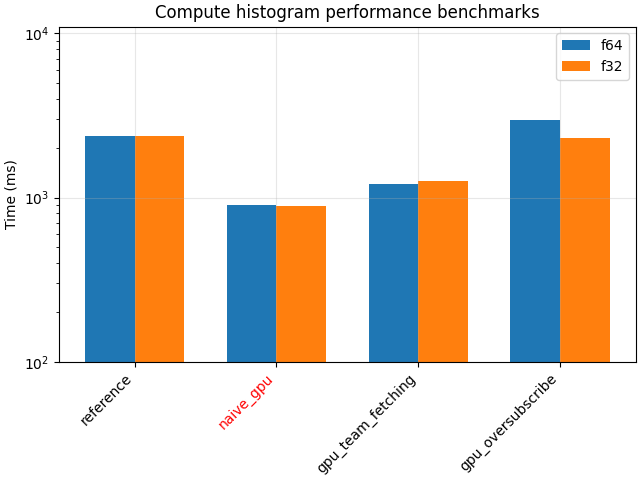
Config: reference, Time f64: 1933.211023ms, Time f32: 1926.4963830000002ms
Info: setting compute_histogram implementation to impl : {"implementation":"naive_gpu","parameters":{}}  [algs][rank=0]
Config: naive_gpu, Time f64: 602.8676135000001ms, Time f32: 945.4414125000002ms
Info: setting compute_histogram implementation to impl : {"implementation":"gpu_team_fetching","parameters":{}}  [algs][rank=0]
Config: gpu_team_fetching, Time f64: 855.4264185ms, Time f32: 854.4192735ms
Info: setting compute_histogram implementation to impl : {"implementation":"gpu_oversubscribe","parameters":{}}  [algs][rank=0]
Config: gpu_oversubscribe, Time f64: 2084.487909ms, Time f32: 1911.281153ms
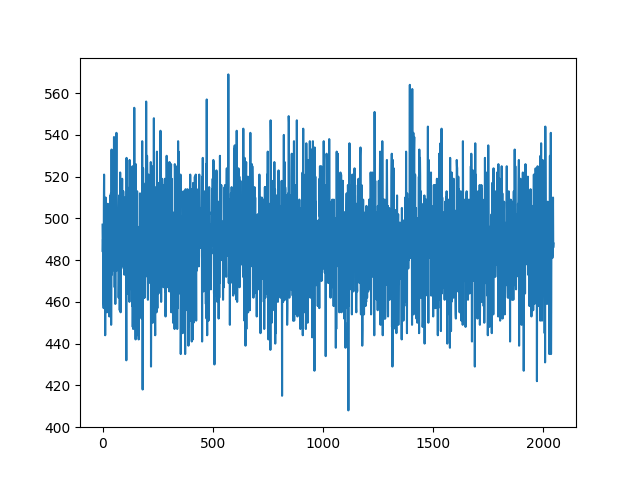
plot the histogram
 97 result = shamrock.algs.compute_histogram_basic_f64(
 98     buf_bin_edge_inf, buf_bin_edge_sup, buf_positions
 99 )
100 plt.plot(result.copy_to_stdvec())
101 plt.show()
plot the results
105 plt.figure(layout="constrained")
106
107 configs = list(results_f64.keys())
108 vals_f64 = [results_f64[c] for c in configs]
109 vals_f32 = [results_f32[c] for c in configs]
110 x = np.arange(len(configs))
111 bar_w = 0.35
112 plt.bar(x - bar_w / 2, vals_f64, bar_w, label="f64")
113 plt.bar(x + bar_w / 2, vals_f32, bar_w, label="f32")
114 plt.xticks(x, configs, rotation=45, ha="right")
115 default_impl_name = json.loads(default_config)["implementation"]
116 for tick_label, cfg in zip(plt.gca().get_xticklabels(), configs):
117     if cfg == default_impl_name:
118         tick_label.set_color("red")
119
120 plt.ylabel("Time (ms)")
121 plt.yscale("log")
122
123 _ymin, _ymax = plt.gca().get_ylim()
124 _ymin = 10 ** int(np.floor(np.log10(_ymin)))
125 _ymax = 10 ** int(np.ceil(np.log10(_ymax)))
126 plt.ylim(_ymin, _ymax * 1.1)
127
128 plt.title("Compute histogram performance benchmarks")
129 plt.legend()
130 plt.grid(True, alpha=0.3)
131 plt.show()
Total running time of the script: (0 minutes 28.897 seconds)
Estimated memory usage: 196 MB